
Freedom Diagnostics is the largest single source of certificates in our COA library. Its lookup works differently from most: it does not show you the results. It tells you whether Freedom filed a report under a code, and hands you the PDF. This guide explains the code, the three ways to reach a report, and what a successful lookup leaves for you to check. For the laboratory’s background and how we rate it, see our Freedom Diagnostics review. To run a certificate through our own tool, use the Freedom COA checker.
How to verify
Verification page: freedomdiagnosticstesting.com
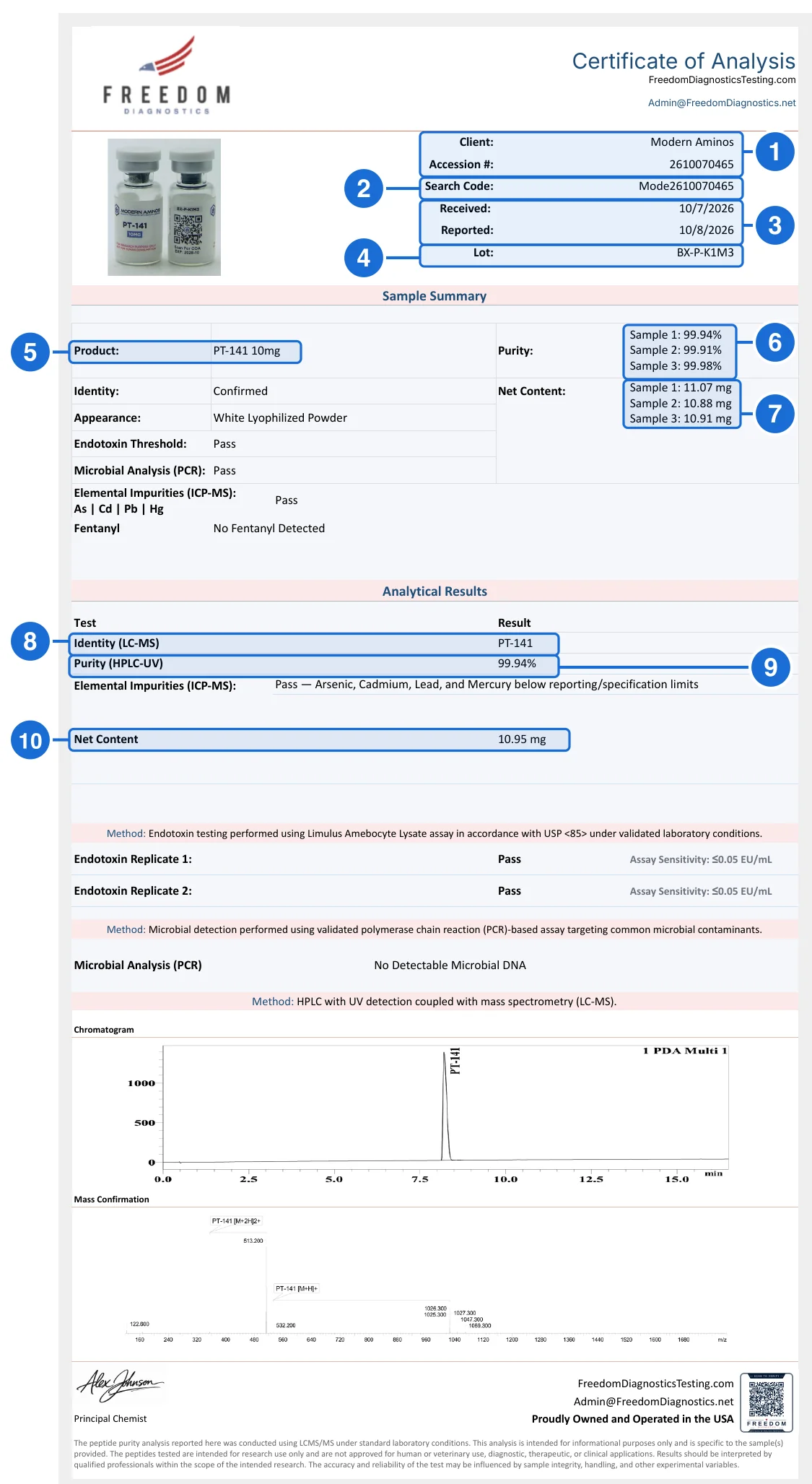
- Client and accession number. Who Freedom tested for, and the ten-digit accession number. The client should be the seller you bought from.
- Search Code. The lookup input: the first four characters of the client name plus the accession number (Mode + 2610070465). Codes are not case-sensitive.
- Received and reported. When the sample arrived and when Freedom reported. Reported comes after received.
- Lot. The batch link. Compare it with the lot on your vial.
- Product. The compound and labeled strength, here PT-141 10mg.
- Purity per sample. One purity figure for each sample Freedom ran, three here.
- Net content per sample. One measured mg for each sample. The spread between vials is here.
- Identity (LC-MS). Mass spectrometry matched the named compound.
- Purity headline. HPLC-UV purity, the mean of the three samples in box 6.
- Net content headline. The measured mg, the mean of the samples in box 7. The vial is labeled 10mg.
- Copy the Search Code (box 2).Top right of the certificate, under the accession number (box 1). If it is missing, build it from the first four characters of the client name plus the accession number.
- Paste it on the lookup page.Use the Search Code / Accession # form on Freedom’s Certificate of Analysis Lookup, remove spaces, and click Look up. Pressing Enter did not submit the form in our test on October 21, 2026; click the button.
- Open the PDF.Look for “Document found” and click Open PDF. Check that the address is on coas.freedomdiagnosticstesting.com.
- Compare the fields.Client (box 1), dates (3), lot (4), product (5), purity (6 and 9), content (7 and 10) and identity (8) must match your copy, along with every panel below them.
Decode the search code
Every Freedom certificate prints a Search Code in the table at the top right, directly under the accession number. Freedom’s page says it is always the first four characters of your company name followed by your accession number. On the certificate used in this guide, issued to Modern Aminos:
- Client printed on the certificate
- Modern Aminos
- First four characters
- Mode
- Accession number
- 2610070465
- Search code
- Mode2610070465 (same as printed: Mode2610070465)
The rule holds in our data. Among the 457 Freedom listings on the price index where both the printed search code and the client name are known, 457 follow it. Two practical consequences: the prefix comes from the name Freedom has on file for the client, which is not always the brand on the product, and a missing or misspelled prefix is the most common reason a correct accession number finds nothing. Codes are not case-sensitive, and any spaces must be removed.
Three ways to reach a Freedom report
Search code
The default. Open the Certificate of Analysis Lookup, paste the code and click Look up.
Use it when you have the certificate in front of you.
Company name
The same page has a second form. Enter the client name exactly as printed, click Search, then Open PDF beside any result.
Use it to see every report filed for a seller. Not case-sensitive.
Direct file link
Reports are served from coas.freedomdiagnosticstesting.com/<search code>.pdf.
Use it when a vendor links the file; check that the host is exactly that domain.
A worked example: Modern Aminos’s PT-141 10mg
Modern Aminos publishes a Freedom certificate for its PT-141 10mg, lot BX-P-K1M3. Entering Mode2610070465 on the lookup page returned a short result:
- Document code
- Mode2610070465
- Issuer
- Freedom Diagnostics Testing
- Status
- Document found
- Link
- Open PDF → coas.freedomdiagnosticstesting.com/Mode2610070465.pdf
That is everything the lookup says. The substance is in the PDF it opens, which we read field by field:
| Field | In this example | What it tells you |
|---|---|---|
| Client (box 1) | Modern Aminos | Who submitted the sample. Should be the seller you bought from. |
| Accession # / Search Code (boxes 1 and 2) | 2610070465 / Mode2610070465 | The identifiers for the lookup. The code must be the prefix plus the accession. |
| Received / Reported (box 3) | October 7, 2026 / October 8, 2026 | When the sample arrived and when Freedom reported. Reported should come after received. |
| Lot (box 4) | BX-P-K1M3 | The batch link. Compare it with the lot on your vial. |
| Product (box 5) | PT-141 10mg | Compound and labeled strength. |
| Sample Summary (boxes 6 and 7) | Purity 99.94%, 99.91%, 99.98%; net content 11.07 mg, 10.88 mg, 10.91 mg | One figure per sample Freedom ran. Shows the spread between vials. |
| Purity (HPLC-UV) (box 9) | 99.94% | The headline purity in the Analytical Results block, the mean of the samples. |
| Net Content (box 10) | 10.95 mg | Headline measured mg, the mean of the samples. The vial is labeled 10mg. |
| Identity (LC-MS) (box 8) | PT-141, Confirmed | Mass spectrometry matched the named compound. |
| Other panels | Endotoxin (LAL, two replicates), PCR microbial, ICP-MS metals, fentanyl screen: all pass or not detected | 7 test categories documented in our data for this report. |
Three vials, one headline number
Freedom runs several samples and prints all of them. The Sample Summary above lists 99.94%, 99.91%, 99.98% purity and 11.07 mg, 10.88 mg, 10.91 mg of net content, while the Analytical Results block states 99.94% and 10.95 mg. They agree: the average of the three purities is 99.94% and the average of the three contents is 10.95 mg. So on this certificate the headline is a mean, and the spread between vials is in the summary. If a vendor quotes only the headline, the summary is where the best and worst vial are. Our price-index listings use the Analytical Results figures.
What “Document found” confirms and what it leaves to you
It confirms
- Freedom Diagnostics filed a report under that code.
- The file sits on Freedom’s own domain, not the vendor’s.
- You can download the file as Freedom holds it.
It leaves to you
- Whether the purity, content and results match your copy.
- Whether the client and lot are the ones on the vendor’s page and your vial.
- Whether the report covers the compound and strength you bought.
So the verification is two steps: the lookup establishes that the document exists, and the comparison establishes that yours is the same document. Open the official PDF beside your copy. If a vendor’s file differs from Freedom’s in any figure, the official file is the reference.
Red flags on a Freedom report
- A search code that is not the prefix plus the accession. The two must agree with the client name printed above them.
- A lookup that finds nothing for the exact printed code. Ask the seller for the original. It is a reason to ask, not proof of fraud: 12 Freedom listings on our price index are in that state.
- A PDF that differs from Freedom’s. Any figure, lot or date that changes between the vendor’s file and the official file is a mismatch. Our library holds 9 such Freedom listings.
- A link to a look-alike domain. Official files are on coas.freedomdiagnosticstesting.com; the lookup is on freedomdiagnosticstesting.com.
- A client name that is not the seller. The report can be genuine and still belong to someone else’s sample.
Freedom reports in PeptidePrices data
The COA library holds 5,458 Freedom certificates from 137 vendors. 4,891 (90%) have been matched to a file in Freedom’s own published list. Freedom’s lookup page says it has over 40,000 public COAs.
On the price index, 2,030 listings show a Freedom report. 1,958 across 117 vendors carry a report matched to Freedom’s file. 399 of them document five or more test categories. The vendors with the most matched Freedom listings are:
- Modern Research Peptides78 matched listings
- Nationwide Peptides75 matched listings
- Novaglo Research74 matched listings
- Lumi Peptides72 matched listings
- Modern Aminos63 matched listings
- Rebirth Labs45 matched listings
What a found Freedom report does and does not prove
What it proves. Freedom Diagnostics filed a report for the code, and the copy you hold is the same document.
What it does not. The certificate itself states that the analysis is specific to the samples provided. It does not show that the sample came from your vial. Only a matching lot ties the two. For a laboratory-neutral checklist, see how to verify a peptide COA.
Freedom Diagnostics verification questions
How do I look up a Freedom Diagnostics COA?
Copy the Search Code from the table at the top right of the certificate, open Freedom's Certificate of Analysis Lookup page, paste the code into the Search Code / Accession # box and click Look up. A line that reads Document found appears with an Open PDF link. Open the PDF and compare it with the copy you were given.
What is the Freedom Diagnostics search code?
It is the first four characters of the client name followed by the ten-digit accession number, for example Mode2610070465 for a certificate issued to Modern Aminos with accession 2610070465. Among the 457 Freedom listings on the PeptidePrices price index where the printed code and the client name are both known, 457 follow that rule. Codes are not case-sensitive, and spaces must be removed.
Can I search with just the accession number?
Freedom's page says you can search by search code, accession number or company name. A bare accession number only works when it matches a single certificate, so use the full search code. If you only have the accession number, the first four characters of the client name on the certificate complete it.
What does Document found mean?
That Freedom holds a PDF filed under that code. The lookup does not display any results, so it does not tell you that the purity, the content or the lot are the ones printed on your copy. Open the PDF and compare every field; a found document is the start of the check, not the end.
Why does the certificate show three purity numbers and one result?
Freedom's Sample Summary lists each sample it ran, for example three purity figures and three net content figures, while the Analytical Results block states one headline purity and one net content. In the certificate we walk through, the headline figures equal the averages of the three samples. A vendor quoting a single number is quoting that average; the individual samples are in the Sample Summary.
What if the Freedom lookup finds nothing?
Check the spelling of the first four characters, which come from the client name printed on the certificate rather than the brand you know, and remove any spaces. If it still finds nothing, ask the seller for the original file. A miss is not proof of a fake: in our price index 12 Freedom listings are in a not-found state out of 2,030, and each was kept with the file we checked.
What does the PeptidePrices checker do with a Freedom report?
It reads the accession number from the certificate you paste or upload and looks for a published file with that accession in Freedom's own list of certificate files. If the file exists, the result shows the client prefix it is filed under and links the official PDF. It does not infer anything from a certificate it cannot find.
Which peptide vendors publish the most Freedom reports?
On the PeptidePrices price index, 1,958 listings from 117 vendors carry a Freedom report that matched Freedom's own file. The vendors with the most are Modern Research Peptides (78), Nationwide Peptides (75), Novaglo Research (74), Lumi Peptides (72), Modern Aminos (63) and Rebirth Labs (45).
Does a found Freedom report prove my vial was tested?
No. It proves that Freedom filed a report under that code. The lot printed on the certificate has to match the lot on your vial, and the client has to be the seller you bought from. Freedom's certificate states that the analysis is specific to the samples provided.