
A Horizon Analytical certificate is a clean, two-page PDF that is simple to read and just as simple to edit. Horizon keeps its own copy of every report and lets anyone with the report number open it. The one thing to get right is which printed number to type: the certificate prints several, and only one is the key. This guide marks them on a real report, walks through the lookup, and lists what to compare. For the laboratory’s background and what we could and could not confirm about it, read our Horizon Analytical review.
How to verify
Verification page: horizonanalytical.com/verify-coa
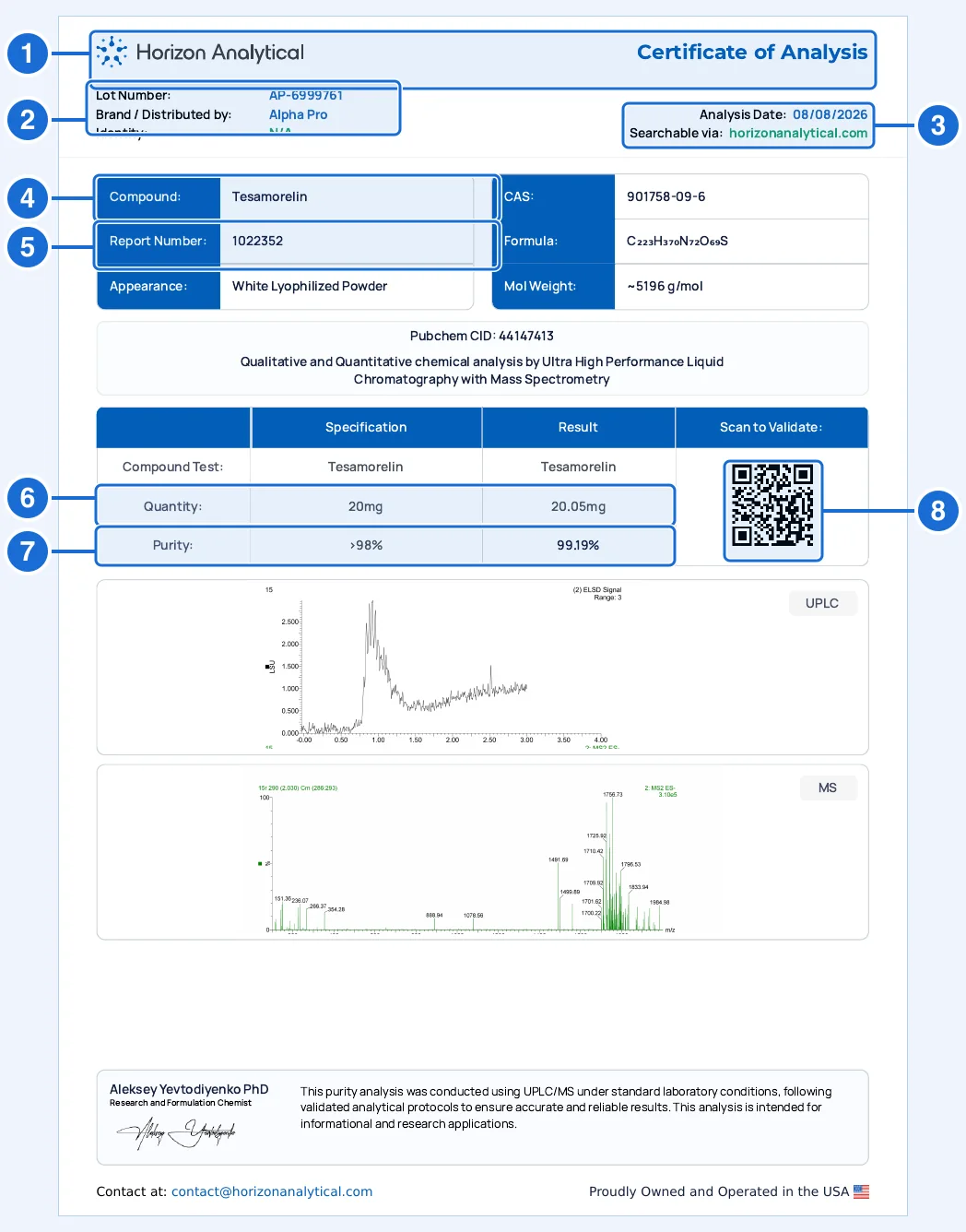
- Lab header. Horizon Analytical’s logo and the title. The contact line at the foot is contact@horizonanalytical.com; a genuine report names no other laboratory.
- Lot number and brand. The lot is the batch the report covers: compare it with the vial and the product page. “Brand / Distributed by” is the company the report was prepared for. The optional Lot Number box on the form takes this lot.
- Analysis date. The date Horizon analyzed the sample, with “Searchable via horizonanalytical.com” beneath it.
- Compound. The compound as Horizon names it. CAS number, formula and molecular weight sit to its right.
- Report number. The number the lookup needs: seven digits, under Compound in the blue block. It is not the lot and it is not the CAS number.
- Quantity. The labeled amount in the Specification column and the amount Horizon measured in the Result column.
- Purity. The purity limit and the measured purity. A purity-only report has no endotoxin line.
- Scan to Validate. The QR code on this report opens horizonanalytical.com/verify-coa, the form, not the record. You still type the report number.
Enter box 5, the report number. It is the seven-digit number labeled “Report Number” (here 1022352). Box 2, the lot (AP-6999761), goes in the form’s second, optional box. The CAS number and the QR code are not inputs.
The lookup, step by step
- Copy the report number.Seven digits, no spaces. In our library 162 of 167 Horizon listings print one in that shape.
- Open the verification page.Go to horizonanalytical.com/verify-coa, headed “Verify Certificate of Analysis”. It has two boxes: “Report Number” (marked required, with 1016124 as its example) and “Lot Number” (optional, with DPS-9014215 as its example).
- Paste the number and click Verify.A “Search Results” table appears with a count (“1 found”) and five columns: company name, lot number with the report number beneath it, compound with its strength, test type, and an action button.
- Click View.Horizon’s own PDF opens in a new tab. That PDF, not the table row and not your copy, is the reference.
- Compare it with your copy.Use the table below.
What a result looks like: Tesamorelin 20mg from Alpha Pro Peptides
Entering 1022352 returns one row. The portal and the PDF it opens agree with the copy in our library on every field:
- Company name
- Alpha Pro
- Lot number
- AP-6999761
- Report
- #1022352
- Compound
- Tesamorelin, 20mg
- Test type
- Purity, ID, Quantitation
- PDF: analysis date
- August 8, 2026
- PDF: quantity
- 20.05mg against 20mg
- PDF: purity
- 99.19%, limit >98%
Read the figures as measurements. The label said 20mg and Horizon measured 20.05mg; the purity limit is a threshold, and 99.19% is the result against it. The table row proves a report with this number, lot and compound exists. Only the PDF shows the numbers, so a row without a matching PDF is not a verification.
Match the PDF Horizon serves against your copy
| Field | Where on the certificate | Where in the portal | What to check |
|---|---|---|---|
| Report number | Compound block, “Report Number” | Under the lot in the results row | Exactly the number you typed. A row with a different number is a different report. |
| Company / brand | “Brand / Distributed by” at the top left | Company Name | Should be the seller you bought from. A different name needs an explanation, not an assumption. |
| Lot | “Lot Number” at the top left | Lot Number | Compare with the vial label. If the seller’s own batch code differs from Horizon’s printed lot, ask for the mapping. |
| Compound and strength | Compound; Specification column | Compound with its strength | Same compound and the same labeled strength as the product. |
| Test type | Method heading above the results table | Test Type | Purity, ID, Quantitation, or Endotoxins. They are separate reports. |
| Analysis date | “Analysis Date” at the top right | On the PDF only | Not in the future, and consistent with when the batch was sold. |
| Quantity and purity | Result column | On the PDF only | The same figures to the same decimals. A re-rounded figure is a difference. |
One lot, two reports
Horizon issues purity and endotoxin as separate reports. Each has its own report number, so the same lot can appear twice in the portal under two numbers (a purity report and an endotoxin report). On October 22, 2026 we looked up the 492 seven-digit report numbers in our library: Horizon returned 490 of them, 273 purity reports and 217 endotoxin reports. If a seller promises endotoxin testing and shows only a purity report, the endotoxin report has a different number and needs its own lookup.
When the portal says “0 found”
“No matching certificate found. Please double-check the report number printed on the COA.” The page found nothing. In our testing it gave this answer for a report number that does not exist and also for a real report number paired with a lot that did not match exactly. A part of a lot (the digits without the prefix) returned nothing either.
So retype the number, then clear the Lot box and try again. If the number alone returns nothing, ask the seller for the original file and write to Horizon at contact@horizonanalytical.com. Two of the 492 numbers we looked up on October 22, 2026 returned nothing, so an empty result is a reason to ask, not proof of a fake.
Red flags on the certificate itself
- No report number. Horizon prints one in the compound block of the reports we looked at. Without it, the lookup has nothing to use.
- A QR code that does not go to horizonanalytical.com. On the report we decoded, the code opens the verify page. A code leading anywhere else is not Horizon’s.
- The number is not seven digits. The form’s own example is seven digits, and so are 162 of 167 listings that print one.
- A lot that differs from the vial without a reason. A real report covers the lot it names. It says nothing about any other lot.
- A different laboratory’s name or contact address. The footer names contact@horizonanalytical.com.
- Only a screenshot of the portal row. A row proves a report exists, not what it says. Ask for the PDF.
Horizon reports in PeptidePrices data
The COA library holds 544 Horizon certificates from 18 vendors, and 432 (79%) have been matched to Horizon’s own record. On the price index, 202 listings (a vendor’s specific compound and strength) show a Horizon report, and 187 across 15 vendors carry one that matched. The vendors with the most matched Horizon listings:
- Summit Research Supply31 matched listings
- MsAmino30 matched listings
- Northline Labs21 matched listings
- Blank Peptides20 matched listings
- Synova Supply16 matched listings
- Averix Labs15 matched listings
Each vendor page shows the certificate beside the listing it covers, with the report number kept copyable so you can repeat the lookup. To see what Horizon is, not just what it prints, read our laboratory review, and for a checklist that works for any lab, see how to verify a peptide COA.
What a matched Horizon report does and does not prove
What it proves. Horizon holds a report with this number, lot and compound, and its PDF says what your copy says. Edits to your copy would show as differences.
What it does not. It does not show which vial the sample came from, and the lot only connects the report to your vial if it matches the vial label. Our review did not find an accreditation for Horizon, so the lookup confirms the record, not a laboratory standard. A page that says “Searchable via horizonanalytical.com” is telling you where to look; it is not itself the check.
Horizon Analytical verification questions
How do I verify a Horizon Analytical COA?
Copy the 7-digit report number printed under the compound name, open horizonanalytical.com/verify-coa, paste it into Report Number and click Verify. The results table lists the company, lot, compound and test type. Click View to open Horizon's own PDF and compare it with the copy you were given.
Which number on a Horizon certificate do I enter?
The report number: seven digits, labeled "Report Number" in the blue block beneath the compound name. The lot number at the top left, the CAS number beside it and the QR code are not what the form asks for. The lookup form marks the report number as required.
Do I have to enter the lot number on the Horizon form?
No, it is optional. If you add it, it narrows the search and has to match the full lot exactly (capital letters do not matter). A lot that is wrong, or only part of the real one, returns "0 found" even when the report number is real, so leave it empty if you are not sure of it.
What does "No matching certificate found" mean on Horizon's page?
Horizon's page found nothing for what was entered. The usual causes are a mistyped report number or a lot that does not match. If the exact number and lot still return nothing, ask the seller for the original file and contact Horizon. It is a reason to stop and ask, not proof the report is fake.
Why does one lot have two Horizon reports?
Horizon issues purity and endotoxin results as separate reports, each with its own report number. Of the 490 report numbers from our library that Horizon returned on October 22, 2026, 273 were purity reports and 217 were endotoxin reports. If a seller shows only one, ask for the other.
Does the QR code on a Horizon certificate verify it?
Not by itself. On the report we decoded, the QR code under "Scan to Validate" opens horizonanalytical.com/verify-coa, the same form, without a report number. You still type the number. Check that a QR code goes to horizonanalytical.com, because a QR code on a copied certificate can point anywhere.
What does the PeptidePrices checker do with a Horizon report?
It looks the report up by its report number and lot, then compares the returned company, lot, compound and test type with your copy. A match is shown as verified, differing fields are shown as a conflict, and a report Horizon does not return is shown as not found rather than as a fake.
Which peptide vendors publish the most Horizon reports?
On the PeptidePrices price index, 187 listings from 15 vendors carry a Horizon report that matched Horizon's own record. The vendors with the most are Summit Research Supply (31), MsAmino (30), Northline Labs (21), Blank Peptides (20), Synova Supply (16) and Averix Labs (15).
Does a verified Horizon report prove my vial was tested?
No. A verified report proves Horizon recorded those results for the sample it describes. It does not prove the vial you hold is from that batch. The compound, strength and lot on the report must match your vial label and the product you bought, and a lot that differs from the seller's own batch code needs an explanation from the seller.