
Janoshik Analytical issues 2,964 of the certificates in our COA library, from 73 vendors. Its reports are simple: one page, a handful of identity fields, a measured amount, a purity figure and a key. That makes a genuine report easy to read, and it makes an edited one easy to produce. This guide shows how to look a report up, what each field means, what has to match, and how the PeptidePrices COA checker handles Janoshik reports when the laboratory itself cannot be queried automatically. For the laboratory’s background, accreditation and track record, read our Janoshik Analytical review.
How to verify
Verification page: janoshik.com/verification
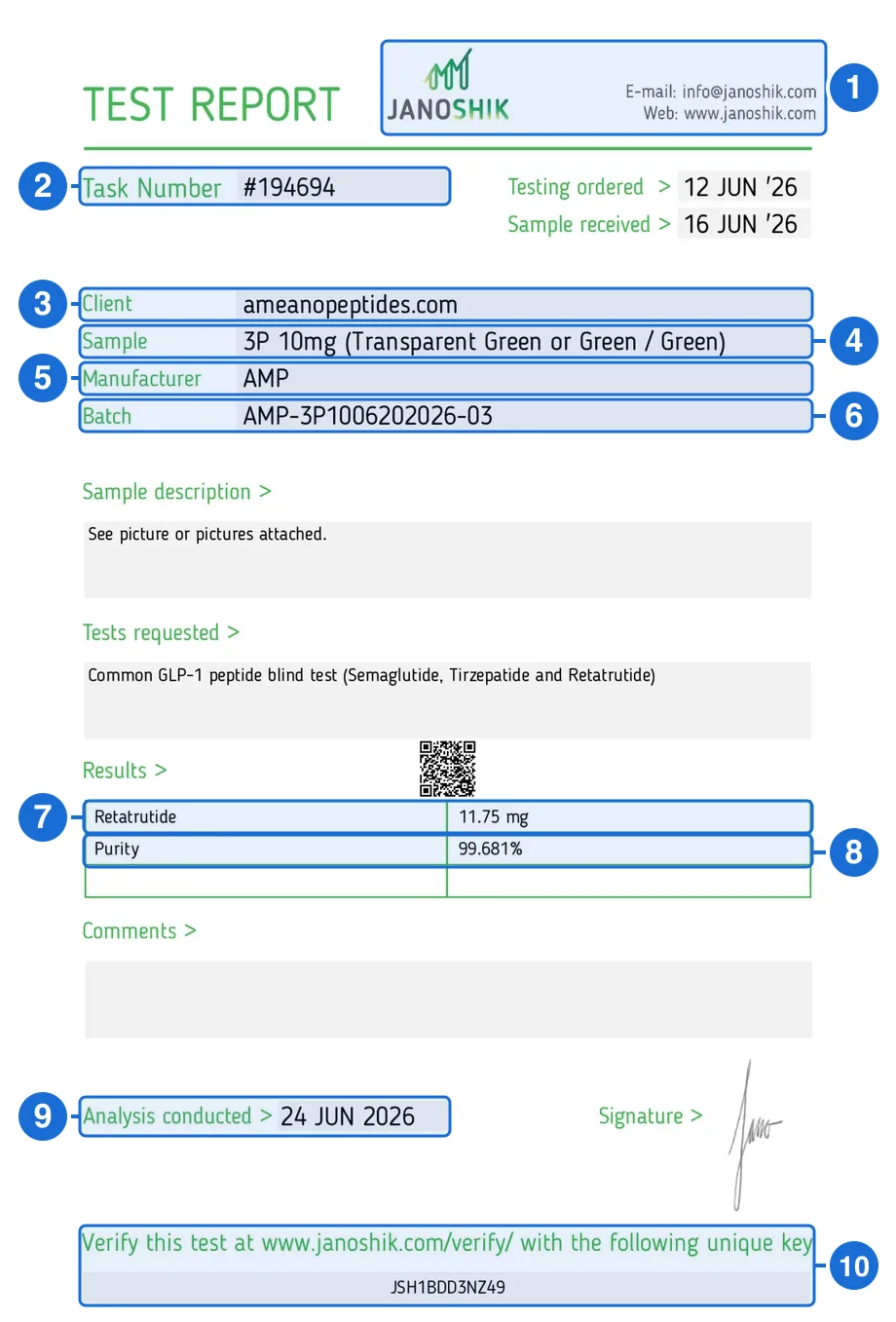
- Lab header. Janoshik’s logo and contact details (info@janoshik.com, www.janoshik.com). A genuine report names no other laboratory or address.
- Task number. The order number after “Task Number”. Copy the digits, without the # sign.
- Client. Who ordered the test. Here it is the vendor’s own website.
- Sample. The product as submitted, with its labeled strength.
- Manufacturer. The maker named for the sample. It can differ from the client.
- Batch. The lot code that should match the vial label and the product page.
- Compound and measured amount. The first row of the results table: what the laboratory found and how many mg.
- Purity. The percentage of the analyzed material that is the target compound.
- Analysis conducted. The date Janoshik ran the analysis. The two dates above it are only when the test was ordered and the sample received.
- Unique key. The 12-character code in the grey box under the verification line. This report still prints the older janoshik.com/verify/ address; use janoshik.com/verification.
- Copy the task number (box 2). It is at the top left of the report after “Task Number”. Copy the digits only, without the # sign.
- Copy the unique key (box 10). It is in the box at the bottom of the report. A genuine key is exactly 12 characters, all capital letters and digits.
- Open Janoshik’s verification page. Go to janoshik.com/verification. Older reports print janoshik.com/verify/ in the footer; that address did not work when we tested it on September 23, 2026. Janoshik’s site shows a Cloudflare browser check first. That check is normal and says nothing about the report.
- Enter both values and click Verify. Put the task number in “Task number” and the key in “Unique key”, then click Open report.
- Compare every field (boxes 3 to 9). Read Janoshik’s record against your copy line by line, using the checklist below.
Many vendors skip the form by linking the record directly or printing a QR code (the report above has one just over the results table); 350 of the 426 published reports in our collection come with a Janoshik record link. A genuine record lives at an address of the form verify.janoshik.com/tests/[task]-[sample]_[key]. Check the domain before you trust what opens. Janoshik’s own pages are on janoshik.com and its subdomains. Look-alike domains such as janoshiklabs.com and janoshik.online appeared in Google results for “janoshik” in October 2026; a page on any domain other than janoshik.com is not Janoshik’s record. Do not build a record address yourself from the product name, either. Use the QR code, the vendor’s link or the form.
What a Janoshik test report contains
A Janoshik report has two halves. The identity fields describe the sample as it was submitted. The results describe what the laboratory measured. Verification ties the two together: the task number and unique key open Janoshik’s own copy, so you can see whether anyone changed either half after the report was issued.
| Field | Where it is printed | What it tells you |
|---|---|---|
| Task number | Top left, after "Task Number" (for example #194694) | The order number Janoshik assigned to this test. You need it for the lookup. |
| Unique key | Bottom box, under "Verify this test at www.janoshik.com/verify/" | Twelve capital letters and digits that pair with the task number. Together they open one report. |
| Client | Identity block | Who ordered the test: a vendor, a manufacturer or a group of buyers. |
| Sample | Identity block | The product as it was submitted, usually a name and a labeled strength such as "10mg". |
| Manufacturer | Identity block | The maker named for the sample. It can differ from the vendor that sells it. |
| Batch | Identity block | The lot code that should also appear on the vial label and the product page. It is the field that links a report to one production run: a vial from batch AMP-3P1006202026-03 is covered by the report above, and a vial from any other batch is not. |
| Testing ordered, sample received, analysis conducted | Date rows | When the order was placed, when the sample arrived and when it was analyzed. Analysis conducted is the date that matters. |
| Results | Results table | What the laboratory measured: the compound found and its amount in mg. The amount is a measurement of what was in the vial, not a restatement of the label, so it usually differs. The report above found 11.75 mg against a 10 mg label. Of the 221 reports in our collection that print both a labeled mg strength and a measured amount, 167 measured above the label and 52 below it. |
| Purity | Below the results | The percentage of the analyzed material that is the target compound. |
What each field should match
There are two comparisons to make, and they answer different questions.
Your copy against Janoshik’s record
Is this document genuine?
- Task number and unique key: identical.
- Client, sample, manufacturer and batch: identical, character for character.
- Compound and measured amount in the results: identical to the decimal.
- Purity: identical to the decimal.
- Analysis conducted date: identical.
The report against the product
Does this report cover what you bought?
- Compound: the same substance the listing sells.
- Strength: the sample’s labeled strength matches the listing and the vial.
- Batch: the code on the report matches the code on the vial label.
- Client: if it is not the vendor, ask who commissioned the test and how the sample was chosen.
A report can pass the first comparison and fail the second: a genuine report attached to a different strength or a different batch. PeptidePrices only shows a certificate on a price listing when the vendor, compound, strength and unit match exactly, and shows none when they do not.
Red flags for an edited Janoshik report
- Janoshik’s record disagrees with your copy. A different purity, amount, compound, batch or date under the same task number and key means the copy was edited. This is the only red flag that is conclusive on its own.
- The key is the wrong shape. Fewer or more than 12 characters, lowercase letters or punctuation. Genuine keys are 12 capital letters and digits.
- The verification box is cropped, blurred or covered. A report shared without its key cannot be checked. Ask for the full page.
- The QR code or link leaves janoshik.com. A QR code that opens a vendor page, a file host or a look-alike domain is not Janoshik’s record.
- One key, two sets of results. If two vendors publish the same task number and key with different numbers, at least one copy is fake.
- The batch is not on your vial. This does not make the report fake, but it means the report does not cover your product.
Some things look suspicious and are not. The Cloudflare check on janoshik.com is routine. A slow or unavailable lookup is unresolved, not a failure. A measured amount above the label is normal. Small differences in fonts or spacing between reports are weak evidence either way; the record lookup settles the question.
How our checker corroborates Janoshik reports
Most laboratories our checker supports publish a lookup it can query directly. Janoshik’s verification pages sit behind an interactive Cloudflare challenge, so the checker cannot ask Janoshik about a report, and we do not try to get around the challenge. Instead it compares a submitted report with Janoshik reports that vendors have already published themselves.
That collection currently holds 426 reports, each stored under its unique key, published by 13 vendors and analyzed between February 2024 to July 2026. We read 120 of them straight from Janoshik record links, transcribed 304 from published report images and retain a Janoshik record link for 350. If two vendors publish the same key with different results, both copies are kept and flagged rather than one overwriting the other. Right now no key holds conflicting copies.
When you paste a Janoshik record link or upload a report, the checker reads the task number, key, compound, measured amount, purity and batch, then looks for the same key. It requires the task number to match too, because in one case we reviewed, a single key appears on more than one task report. Purity and amount are compared to within 0.01, and compound names are matched loosely enough that a vendor’s abbreviation or codename for the same substance does not count as a difference. A pasted janoshik.com link is resolved from the collection instead of being fetched, since a fetch would only return the Cloudflare block. Four outcomes are possible:
Corroborated
When: The same task number and key are in the collection, and the compound, purity, measured amount and batch agree.
What it means: An independent published copy of this report carries the same results. That is strong evidence, but Janoshik itself has not answered, so we never call it confirmed.
Conflict
When: The same task number and key are in the collection, but a compared field is different.
What it means: One task number and key identify one test. Two documents with different results cannot both be genuine, so one of them has been edited. This is the strongest counterfeit signal the checker can give.
Not in the collection
When: We hold no published copy of this key.
What it means: Nothing at all. The collection samples what vendors publish; it is not Janoshik's registry. Look the report up at janoshik.com/verification yourself.
Malformed key
When: The verification box is present but the key is not 12 capital letters and digits.
What it means: Genuine Janoshik reports always print a 12-character key, so the checker marks this as a mismatch.
The asymmetry is deliberate. A hit can only ever corroborate, because the matching copy came from a vendor rather than the laboratory. A conflict is close to proof of editing, because a genuine key identifies a single test. A miss proves nothing, because most Janoshik reports have never been published by a vendor we track. That is why the checker never labels a Janoshik report fake for being absent, and why the final word is always the lookup at janoshik.com/verification.
Janoshik reports in PeptidePrices data
Separately from the checker’s collection, the COA library holds 2,964 Janoshik certificates from 73 vendors. 2,441 of them have been matched to Janoshik’s own record of the same task number and key, with the vendor confirmed. The other 523 stay in the library, and each one shows its own lookup or attribution state.
On the price index, 638 listings (a vendor’s specific compound and strength) show a Janoshik report. Of those, 593 across 46 vendors carry a report matched to Janoshik’s record. 20 carry a matched report whose printed client does not clearly identify the vendor, 13 could not be looked up when checked, and 12 have only had the file itself reviewed. None is in a conflict state. The vendors with the most verified Janoshik listings are:
- Nexaph54 verified listings
- ZestyRat Research48 verified listings
- Eppix Labs47 verified listings
- CertaPeptides46 verified listings
- Ameano Peptides44 verified listings
- Omega Peptides27 verified listings
Each profile shows the matched certificate beside the listing it covers, with the task number and key kept copyable so you can repeat the lookup yourself.
What a verified report does and does not prove
A report that matches Janoshik’s record proves that Janoshik tested the sample it describes and recorded those results. It does not prove that your vial came from that sample. The batch match is what connects the two, and the client chose which sample to send. For a laboratory-neutral checklist that covers other issuers, see how to verify a peptide COA. To compare issuers, see the peptide testing laboratory directory, or run any report through the COA checker.
Janoshik verification questions
How do I verify a Janoshik Analytical test report?
Open janoshik.com/verification, enter the task number from the top of the report (without the # sign) and the 12-character unique key from the verification box at the bottom, then click Verify and open the report. Compare the client, sample, batch, results, purity and analysis date with the copy you were given. Every field should match exactly.
Where is the unique key on a Janoshik report?
It sits in the box at the bottom of the report, under the line that begins "Verify this test at www.janoshik.com/verify/". It is 12 characters long and uses only capital letters and digits. The task number is printed separately at the top left, next to "Task Number".
Why doesn't janoshik.com/verify/ work?
Older Janoshik reports print janoshik.com/verify/ in their footer, but that address did not work when PeptidePrices tested it on September 23, 2026. Use janoshik.com/verification instead. The form asks for the same task number and unique key.
How can I tell if a Janoshik report has been edited?
Look the report up yourself. If Janoshik's record shows a different compound, purity, measured amount, batch or date from the copy you hold, that copy was changed. A key that is not exactly 12 capital letters and digits, or a QR code that leads off janoshik.com, is also a strong warning sign.
What does the PeptidePrices checker do with a Janoshik report?
Janoshik's verifier blocks automated requests, so the checker compares the report with 426 Janoshik reports that 13 vendors have published themselves. A match on the same task number and key is reported as corroborated. Different results under the same task number and key are a strong sign that one copy was edited. No match tells you nothing, because the collection is not Janoshik's registry.
Which peptide vendors publish the most Janoshik reports?
On the PeptidePrices price index, 593 listings from 46 vendors carry a Janoshik report that matched Janoshik's own record. The vendors with the most are Nexaph (54), ZestyRat Research (48), Eppix Labs (47), CertaPeptides (46), Ameano Peptides (44) and Omega Peptides (27).
Does a verified Janoshik report prove my vial was tested?
No. A verified report proves that Janoshik tested the sample it describes and recorded those results. To connect it to your vial, the compound, strength and batch on the report must match the product and the vial label. Even then, the sample tested was the one the client sent.