
ILS Laboratories certificates look the same whether the sample came from a careful vendor or a careless one, and a PDF is easy to edit. ILS keeps its own copy of every report it issues and lets anyone with the access code open it. This guide shows where that code is, what the portal returns, which fields to compare, and what a mismatch looks like. For the laboratory’s accreditation and track record, read our ILS Laboratories review. To run a certificate through our own checker, use the ILS COA checker.
How to verify
Verification page: ils-lab.com/verify
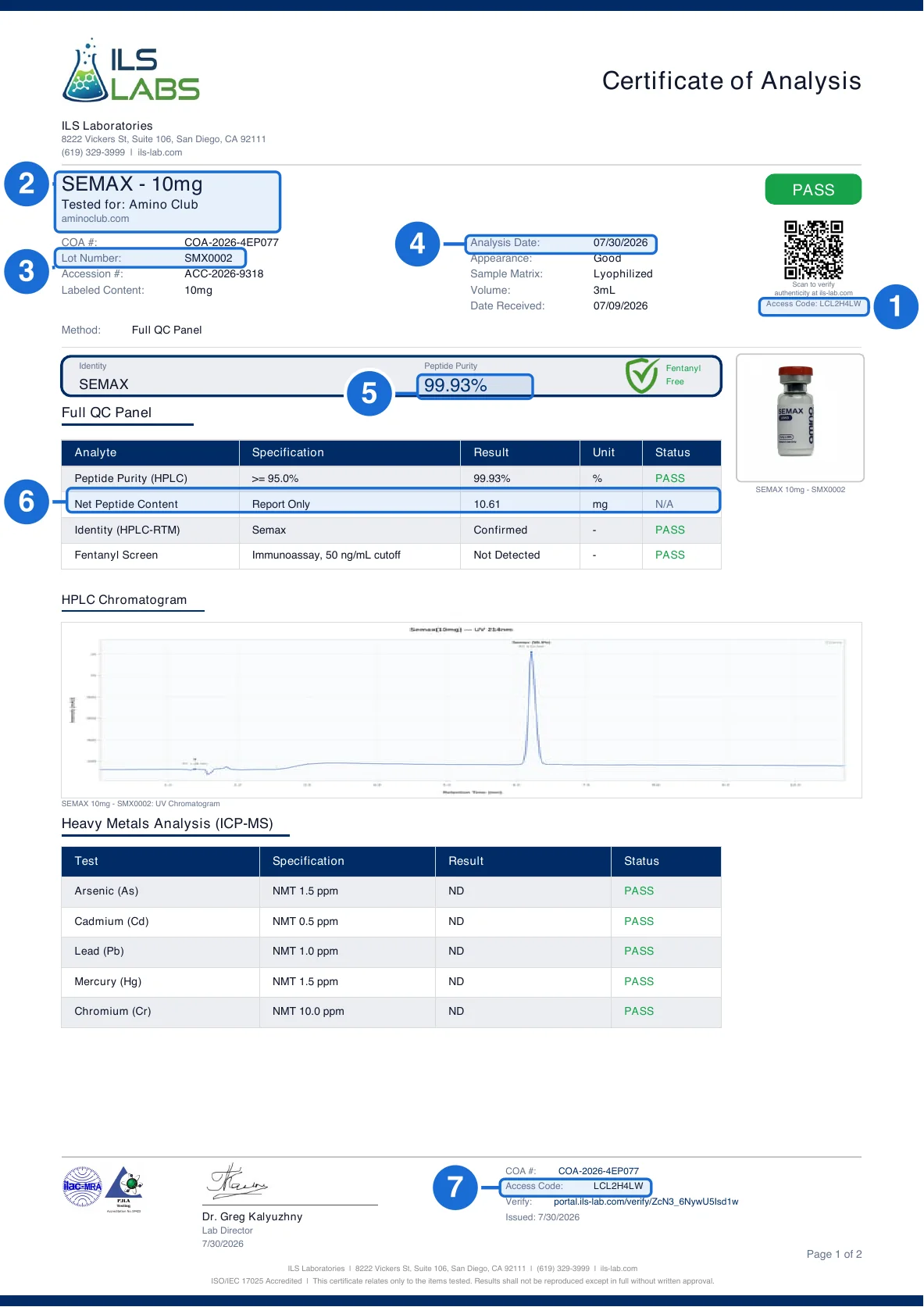
- Access code. The one number that opens the record. It is in bold directly under the QR code at the top right and reads LCL2H4LW here: 7 or 8 letters and numbers. Type or paste it at ils-lab.com/verify.
- Product and client. The compound with its labeled strength, and “Tested for”, the company that submitted the sample.
- Lot number. The batch. It should match the lot on your vial label.
- Analysis date. When ILS ran the analysis. Date Received, three rows below it, is when the sample reached the laboratory.
- Peptide purity. The HPLC purity percentage. ILS’s record shows the same figure.
- Net peptide content. The measured mg, a measurement and not a copy of the label. Here 10.61 against a 10mg label.
- Access code in the footer. The footer repeats the same code. Use it if a screenshot has cropped the header.
- Find the access code (box 1).It is the bold code directly under the QR code at the top right of page one. On this certificate it is LCL2H4LW. ILS says codes are typically 7 or 8 letters and numbers. If a screenshot has cropped the header, the footer prints the same code after “Access Code:” (box 7).
- Open ILS’s own verification page.Go to ils-lab.com/verify. The page has one box, labeled “Access Code”.
- Type or paste the code and click Verify Certificate.The page moves to a portal.ils-lab.com address and the record fills in after a few seconds. Scanning the QR code does the same thing.
- Read the status line.A real record opens with “Verified Certificate” and, when every analyte passed, “All tests passed. This certificate is verified and authentic.” That sentence is ILS’s statement about its record, not about your PDF.
- Compare the record with your copy (boxes 2 to 6).The client and product, lot, analysis date, purity and net content must match the PDF. The record, not the PDF, is the reference.
Only the access code works. The COA number (COA-2026-…), the accession number (ACC-2026-…) and the long portal.ils-lab.com/verify/… link in the footer are not lookup inputs. If a seller says the code is the number starting COA-, it is not.
If you see “Certificate Not Found” do not stop at the first try. The usual cause is a typing error: the footer link mixes a capital I and a lowercase l, which look almost identical. In our own test, retyping the footer link returned Certificate Not Found while the access code returned the full record. Paste or scan instead of typing, and write to info@ils-lab.com before drawing a conclusion.
What the record shows: Amino Club’s Semax 10mg
Amino Club publishes this certificate for its Semax 10mg, lot SMX0002(a two-page report). In our test on October 21, 2026, entering LCL2H4LW at ils-lab.com/verify redirected to ILS’s record, which reads:
- Tested for
- Amino Club (aminoclub.com)
- Product
- SEMAX - 10mg
- Lot number
- SMX0002
- Test type
- Full QC Panel
- Date received
- July 9, 2026
- Analysis confirmed
- July 30, 2026
- Peptide purity (HPLC)
- 99.93%, limit at least 95.0%
- Net peptide content
- 10.61 mg, reported without a limit
- Panel on the record
- Identity, heavy metals (As, Cd, Pb, Hg, Cr), PCR sterility, endotoxin and a fentanyl immunoassay, each marked pass
Every line matches the vendor’s PDF: the client, the product, the lot, the 99.93% purity and the 10.61 mg measured content. Two details are worth reading closely. The measured content is a measurement, not a restatement of the label: the vial says 10mg and ILS found 10.61 mg. And the record states the analysis date in a form you cannot change: analysis confirmed July 30, 2026, while July 9, 2026 is the day the sample reached the laboratory.
Match your PDF against the portal record
| Field | On the PDF | On the portal record | What to check |
|---|---|---|---|
| Client (box 2) | “Tested for:” under the product name | “Tested for” with the client’s website | The name should be the seller you bought from, not a different brand. |
| Product (box 2) | Large heading, for example SEMAX - 10mg | Product | Compound and labeled strength must be identical. |
| Lot (box 3) | Lot Number | Lot Number | Compare to the lot on your vial label. This is the batch link. |
| Dates (box 4) | Analysis Date and Date Received | Date Received and Analysis Confirmed | The analysis date should be after the received date and not in the future. |
| Purity (box 5) | Peptide Purity (HPLC) with a status | Peptide Purity (HPLC) and its limit | Same percentage, same pass status. |
| Content (box 6) | Net Peptide Content in mg | Net Peptide Content | Same mg value. A re-rounded figure is a difference. |
| Identity | Identity (HPLC-RTM): Confirmed | Identity (ID): Confirmed | The named compound should match the product. |
| Metals, sterility, endotoxin | Heavy metals table on page one; sterility and endotoxin sections follow | Listed beneath the main results | Every analyte and its method should appear in both. A missing section is a mismatch. |
| Notes | Footer text on each page | Notes & Methodology | The accreditation and disclaimer wording should be the same. |
When the PDF and the portal record disagree
In the ILS certificates in our library, a handful of differences recur. They are not all fraud, and they are all worth asking about.
- Endotoxin method wording. The record names the test and its method; a PDF that describes a different method, or omits it, does not match.
- Metal results. A vendor PDF that shows every metal as not detected while the record shows a value is the most serious version of this.
- A different client. The record names a company other than the one selling the product. The sample was real, but it was submitted by someone else.
- A code that resolves to something else. The record opens but describes a different compound, strength or lot.
Send the seller the portal address and the differing field. A genuine report with a transcription error is corrected quickly; an edited one is not.
Red flags before you even look it up
- No access code anywhere on the page. ILS prints the code in the header and again in the footer.
- A header with no QR code. The QR code and access code travel together.
- The COA number used as the access code. If a seller says the code is the number starting COA-, the code is wrong. ILS’s own form does not accept it.
- A footer link on another domain. The verify link is on portal.ils-lab.com. Any other address is not ILS’s record.
- The analysis date is earlier than the date the sample was received. Both dates are on the genuine report, in that order.
- A lot number that differs from the one on your vial. A real report proves the lot it names; it says nothing about any other lot.
ILS reports in PeptidePrices data
The COA library holds 2,064 ILS certificates from 68 vendors. 1,861 (90%) have been matched to ILS’s own record. The rest stay in the library with their own state, such as a code ILS did not recognize or a record whose fields differ.
On the price index, 917 listings (a vendor’s specific compound and strength) show an ILS report. 916 across 54 vendors carry a report matched to ILS’s record. Of those, 752 document five or more tests, because ILS’s full panel adds metals, sterility and endotoxin to purity, content and identity. The vendors with the most matched ILS listings are:
- Glow Aminos78 matched listings
- Flawless Compounds76 matched listings
- Disguised Alpha65 matched listings
- Elite Science Labs59 matched listings
- Crush Research51 matched listings
- American Amino & Peptides44 matched listings
Each vendor page shows the matched certificate beside the listing it covers, with the access code kept copyable so you can repeat the lookup.
What a matched ILS report does and does not prove
What it proves. ILS tested the sample it describes and recorded those results, and the copy you hold has not been altered. The record states that ILS holds ISO/IEC 17025 accreditation for the activities in its published PJLA scope, and that peptide testing on the certificate is performed for research use only.
What it does not. The same record says that sample identifications, product names, brand names, lot numbers and labeled content are provided by the submitting party and have not been independently verified. The client chose which sample to send. Only a matching lot number ties the report to your vial. For a laboratory-neutral checklist, see how to verify a peptide COA.
ILS verification questions
How do I verify an ILS Laboratories COA?
Find the access code printed in bold under the QR code at the top right of the certificate, open ils-lab.com/verify, enter the code and click Verify Certificate. ILS opens its own record on portal.ils-lab.com. Compare the client, product, lot, results and analysis date with the copy you were given. Scanning the QR code does the same thing.
Where is the ILS access code?
In the top-right header of the certificate, in bold directly below the QR code, under the line that says to scan it to verify authenticity at ils-lab.com. The footer repeats it as "Access Code:" next to the COA number. ILS's form shows a 7-character example and says codes are typically 7 or 8 letters and numbers.
Does the COA number work in the ILS lookup?
No. The number that starts COA-2026- identifies the report but is not the lookup input. The verification page asks for the access code only, so entering the COA number will not find the record.
What does "Certificate Not Found" mean on the ILS portal?
The portal has no record for what it was given. The most common cause is a mistyped code or a hand-retyped footer link: the link mixes capital I and lowercase l, which are easy to confuse. Paste or scan instead of typing. If the exact printed QR code still returns Certificate Not Found, ask the seller for the original file and write to info@ils-lab.com. It is a reason to stop and ask, not proof the report is fake.
Can the PDF and the ILS portal record differ?
Yes, and the portal record is the reference. In our library, differences have appeared in the metals results and in how the endotoxin method is described, even when the product, lot and client matched. Compare the analysis date and every result; a differing result is a mismatch to raise with the seller, whichever copy is newer.
What does the PeptidePrices checker do with an ILS report?
It reads the access code or QR identifier from the certificate you paste or upload, asks ILS's public record service for that code, and compares the returned client, product, lot and results with your copy. A match is verified, a different record is shown as a conflict with the differing fields, and a code ILS does not recognize is shown as not found rather than as a fake.
Which peptide vendors publish the most ILS reports?
On the PeptidePrices price index, 916 listings from 54 vendors carry an ILS report that matched ILS's own record. The vendors with the most are Glow Aminos (78), Flawless Compounds (76), Disguised Alpha (65), Elite Science Labs (59), Crush Research (51) and American Amino & Peptides (44).
Does a verified ILS report prove my vial was tested?
No. A verified report proves ILS tested the sample it describes and recorded those results. ILS states on the record that product names, lot numbers and labeled content are supplied by the submitting party and not independently verified. To connect the report to your vial, the compound, strength and lot must match the product and the vial label.