
Chromate’s verification does one thing: it shows you the certificate Chromate holds for a job. There is no results table to read, only a document to compare with yours. That makes the lookup quick and the comparison the whole job. This guide covers the two-part code, the lookup, what to compare and what to be careful of. For the laboratory’s background and how we rate it, see the Chromate review. To run a certificate through our checker, use the Chromate COA checker.
How to verify
Verification page: chromate.org/verify
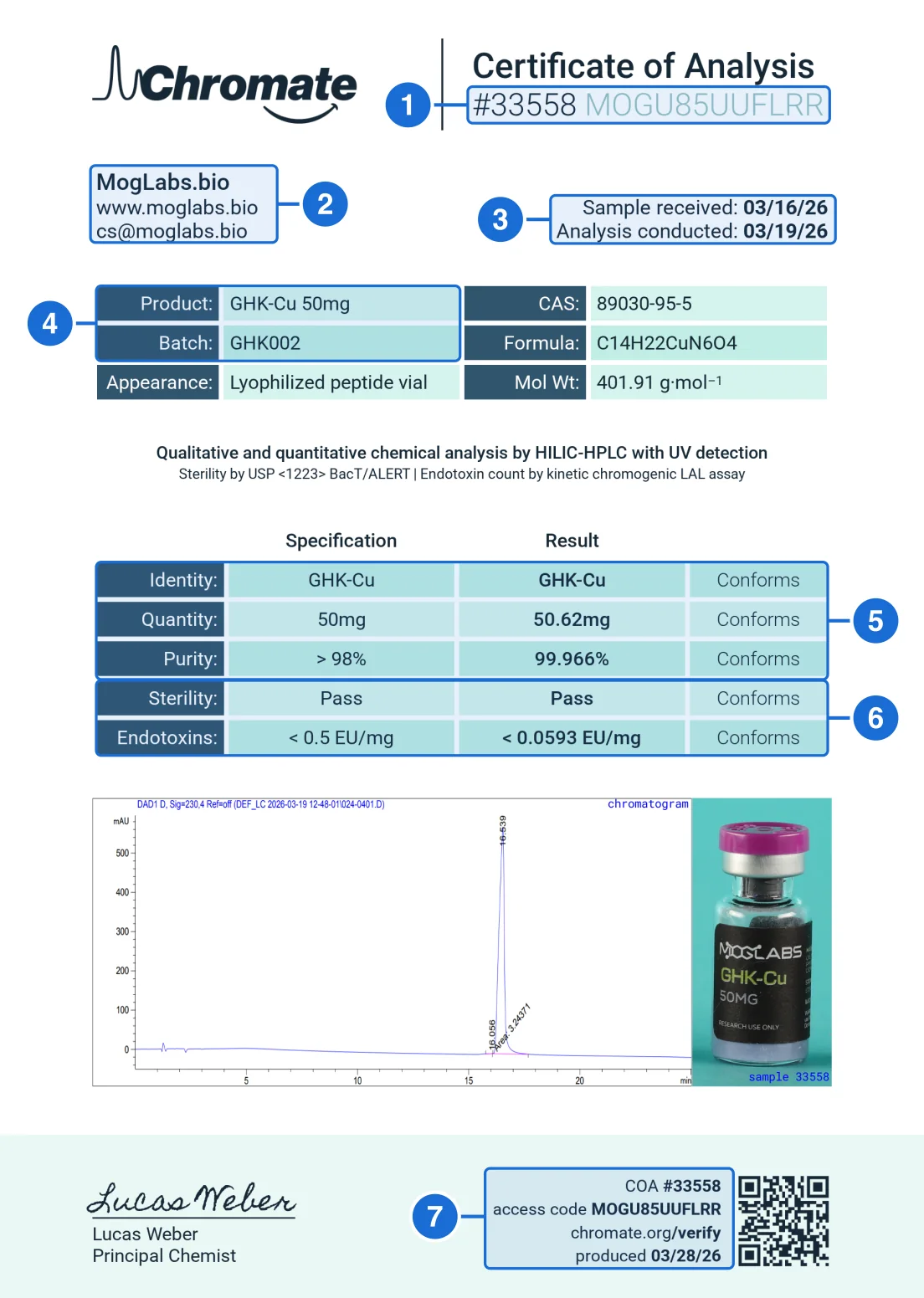
- Job number and access code. Printed together after the title as #33558 MOGU85UUFLRR. The verifier needs both.
- Client. Who the test was for. It should be the seller you bought from.
- Sample received and analysis conducted. The sample arrives first; the analysis date is the date testing took place.
- Product and batch. The compound with its strength and the batch code. Compare the batch with your vial label.
- Identity, quantity and purity. Specification and result for each. The measured 50.62mg and 99.966% must be identical in Chromate’s copy.
- Sterility and endotoxins. Pass, and the endotoxin figure with its limit.
- Footer job number and access code. The same pair repeated beside the QR code and chromate.org/verify. It must equal box 1. “Produced” is the date the certificate was generated.
- Copy both values (box 1).They sit after the title (the footer repeats them in box 7). Digits first, then the letters and digits after them. No # sign.
- Open the verifier.Go to chromate.org/verify. A Validate dialog opens over the home page with two fields, Job Number and Access Code.
- Enter them and press Validate.Or use the direct link a vendor gives you: chromate.org/verify?c=33558_MOGU85UUFLRR.
- Read the page.It is headed “Job 33558”, then “Secure DocuView”, then the certificate and a Download link. The file is served from chromate.org itself.
- Compare it with your copy.Use the fields below: client (box 2), dates (3), product and batch (4), results (5 and 6).
The two-part code beside the title
A Chromate certificate prints its credentials in one line, directly under “Certificate of Analysis” at the top right. The footer repeats them beside the QR code and the chromate.org/verify address.
- Printed under the title
- #33558 MOGU85UUFLRR
- Joined for the direct link
- 33558_MOGU85UUFLRR
- Job number
- 33558 (dark digits)
- Access code
- MOGU85UUFLRR (lighter letters, 12 characters)
You need both. The job number alone does not open the record. On some reports the access code starts with letters taken from the client’s name (this one begins MOG, for MogLabs.bio), which is a handy consistency check, but many codes are random, so a missing prefix tells you nothing.
A worked example: Moglabs’s GHK-Cu 50mg
Moglabs publishes Chromate job 33558 for its GHK-Cu 50mg. Entering the job number and the access code opens a certificate that reads, field by field:
| Field | In this example | What to check |
|---|---|---|
| Client block (box 2) | MogLabs.bio, with its website and email | The client should be the seller you bought from. |
| Sample received (box 3) | March 16, 2026 | Before the analysis date. |
| Analysis conducted (box 3) | March 19, 2026 | The testing date; the produced date in the footer comes later. |
| Product and batch (box 4) | GHK-Cu 50mg, batch GHK002 | Compare the batch with the lot on your vial. |
| Method line | HILIC-HPLC with UV detection; sterility by USP <1223> BacT/ALERT; endotoxin by kinetic chromogenic LAL | The methods named should match the tests reported below it. |
| Quantity (box 5) | Specification 50mg, result 50.62mg | Same measured mg in both copies. |
| Purity (box 5) | Specification > 98%, result 99.966% | Same percentage in both copies. |
| Sterility (box 6) | Pass | Present, with its method. |
| Endotoxins (box 6) | Specification < 0.5 EU/mg, result < 0.0593 EU/mg | Same figure in both copies. |
| Vial photograph | A MogLabs GHK-Cu 50MG vial labeled “sample 33558” | The label should name the vendor, compound and strength. |
| Footer (box 7) | COA #33558, access code MOGU85UUFLRR, produced March 28, 2026 | The footer job number and code must equal the header’s. |
Two things stand out. First, this certificate has no heavy-metals row, while Chromate’s BPC-157 certificate for the same vendor has one: Chromate certificates differ in which categories they report, and our data records 5 test categories for this one. Second, the measured quantity (50.62mg) is a measurement and sits slightly above the labeled amount. The 99.966% purity is the figure the vendor’s listing quotes, and it is what the official document says.
Compare two copies of one document
What the official page gives you
- The certificate as Chromate holds it, with a Download link.
- A file on chromate.org, named by a long hash rather than by the vendor.
- Nothing else: no summary, no verdict.
What you do with it
- Place it beside the vendor’s copy and read every figure.
- Check the batch against your vial.
- Check the client against the seller.
Because the record is the certificate itself, there is no second source to cross-check against. Any difference between the two images, however small, is a difference between the document Chromate holds and the document you were sent.
Red flags on a Chromate report
- A code that does not open anything. If the exact job number and code printed in the footer open nothing, ask the seller for the original before drawing a conclusion.
- A job number and code in the footer that differ from the header. They are the same pair printed twice.
- An access code that is not 12 letters and digits. Nearly every Chromate code in our library is 12 characters.
- A figure that differs between the two copies. Purity, content, endotoxin or batch. Even a re-rounded value counts.
- A produced date earlier than the analysis date. The certificate is generated after the work, as in the example.
- A verify link on another domain. The official page and its files are on chromate.org.
- A vial photograph with a different label. The photo should show the seller’s product.
Chromate reports in PeptidePrices data
The COA library holds 602 Chromate certificates from 32 vendors. 505 (84%) have been matched to Chromate’s own record.
On the price index, 145 listings show a Chromate report, and 145 across 19 vendors carry one matched to Chromate’s record. 33 of those document five or more test categories. The vendors with the most matched Chromate listings are:
- Veltrigen27 matched listings
- Origin Research24 matched listings
- Disguised Alpha16 matched listings
- Pantheon Peptides16 matched listings
- RUO Bio13 matched listings
- Moglabs11 matched listings
What a verified Chromate report does and does not prove
What it proves. Chromate holds the certificate under that job and code, and the copy you hold is the same document.
What it does not. Chromate analyzes the sample it is sent. The batch has to match your vial, and the client has to be the seller you bought from. For a laboratory-neutral checklist, see how to verify a peptide COA.
Chromate verification questions
How do I verify a Chromate COA?
Copy the job number and the access code printed together beside the title, in the form #33558 MOGU85UUFLRR. Open chromate.org/verify, enter the job number and the access code in the Validate dialog and submit. Chromate opens the certificate it holds under Secure DocuView, with a Download button. Compare it with your copy.
Where are the Chromate job number and access code?
At the top right, after the words Certificate of Analysis: the job number in dark digits, then the access code in lighter letters. The footer repeats both, beside the QR code and the chromate.org/verify address. The access code is 12 letters and digits.
Do I need both the job number and the access code?
Yes. The Validate form has two fields, Job Number and Access Code, and the direct link carries both joined by an underscore: chromate.org/verify?c=33558_MOGU85UUFLRR. The job number alone does not open the record.
Does the access code tell me who the client is?
Sometimes. On some Chromate reports the code starts with letters from the client's name, as MOGU85UUFLRR does for MogLabs.bio, but many codes are random. A prefix that matches the client is a useful consistency check; a missing prefix means nothing.
What does the Chromate record show?
A page headed with the job number and Secure DocuView, showing the certificate image served from Chromate's own site, with a Download link. There is no separate results table: the certificate is the record, so the comparison is between two copies of the same document.
What is the date at the bottom of a Chromate certificate?
The footer says produced and gives a date. In the example it is March 28, 2026, nine days after the March 19 analysis date. The header's Analysis conducted date is the testing date; the produced date is when the certificate was generated.
What does the PeptidePrices checker do with a Chromate report?
It reads the job number and access code from your certificate or from a chromate.org/verify link, asks Chromate's public registry whether that pair is recognized, and fetches the certificate Chromate holds so the two can be compared. A pair the registry does not recognize is shown as not found, not as a fake.
Which peptide vendors publish the most Chromate reports?
On the PeptidePrices price index, 145 listings from 19 vendors carry a Chromate report that matched Chromate's own record. The vendors with the most are Veltrigen (27), Origin Research (24), Disguised Alpha (16), Pantheon Peptides (16), RUO Bio (13) and Moglabs (11).
Does a verified Chromate report prove my vial was tested?
No. It proves Chromate holds the certificate and your copy matches it. The batch on the certificate has to match the batch on your vial, and the client has to be the seller you bought from. The certificate's vial photograph helps: it should show the vendor's label.